
Boost Your PC's Performance: How Upgrading to an SSD Can Transform a Slow Computer
Upgrade your old laptop or pc with an ssd drive and get up to 5x faster speeds.
HARD DRIVES
Tom Hunter
11/24/20258 min read
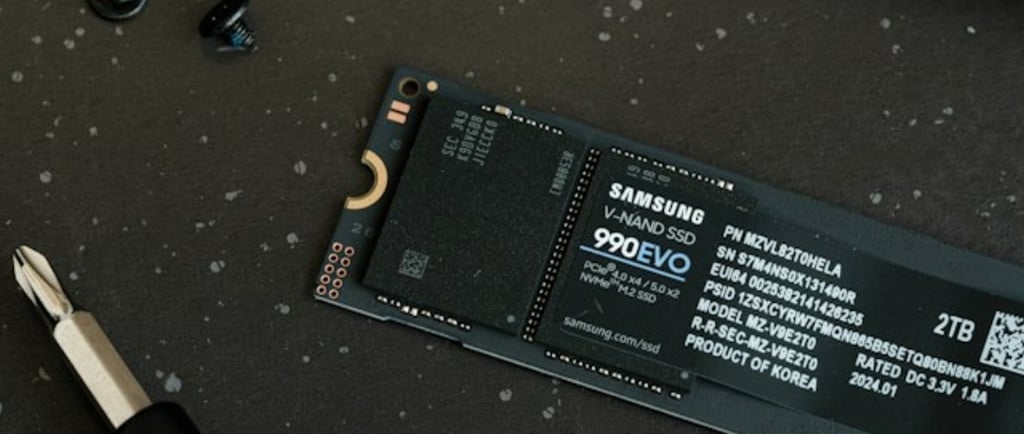
Introduction to Storage Technology
In today’s digital landscape, the choice of storage technology plays a pivotal role in overall computer performance. Two primary types of storage devices are commonly utilized in computing: the traditional Hard Disk Drive (HDD) and the more modern Solid State Drive (SSD). Each of these storage options possesses distinct characteristics that cater to varying user needs.
Hard Disk Drives are the older of the two technologies, relying on spinning disks coated with magnetic material to read and write data. This mechanical process can lead to slower data access times, particularly as files become fragmented over time. In contrast, Solid State Drives use flash memory to store data, allowing for much quicker read and write times. This fundamental difference in technology results in SSDs being significantly faster compared to their HDD counterparts.
Beyond speed, reliability is another critical factor distinguishing these two storage solutions. HDDs contain moving parts, which not only makes them more susceptible to mechanical failure but also increases the risk of data loss due to shocks or drops. Conversely, SSDs, with no moving parts, exhibit greater durability and longevity, making them a more reliable option for users aiming to preserve essential files.
In addition to speed and reliability, power consumption and heat generation are important considerations. SSDs generally consume less power and produce less heat than HDDs. This can lead to improved battery life in laptops and quieter operation in desktop systems, enhancing the overall user experience. Understanding these fundamental differences in storage technology is crucial, particularly for those contemplating the transition from an HDD to an SSD. This upgrade is widely regarded as one of the most impactful performance enhancements for computers today.
The Impact of Storage Speed on Computer Performance
The speed of a computer's storage device plays a crucial role in its overall performance. Storage devices such as hard disk drives (HDDs) and solid-state drives (SSDs) differ significantly in terms of their read and write speeds, which directly influence the speed at which data can be loaded, processed, and stored. Traditional HDDs, while effective for basic storage, operate using spinning platters and mechanical arms that can slow down access times considerably. In contrast, SSDs utilize flash memory, allowing for rapid data access and transfer speeds, often ranging from 200 MB/s to upwards of 5,000 MB/s depending on the technology used.
One of the most noticeable impacts of switching to an SSD is observed in boot times. Conventional HDDs can take several minutes to boot a computer, while systems equipped with SSDs can significantly reduce this time to mere seconds. This reduction in boot time leads to a more efficient and productive user experience, allowing users to resume work more quickly after powering on their devices.
Application launch speeds also benefit from the use of SSDs. Programs that might take over ten seconds to load on an HDD can often start in just a second or two on an SSD, enabling users to access the tools they need without unnecessary delays. Additionally, file transfer rates are substantially improved; massive files that once took several minutes to copy can now be transferred in a fraction of the time, facilitating smoother workflows for tasks like video editing and large data analysis.
In summary, the transition from an HDD to an SSD significantly enhances a computer's performance across various metrics. Faster read and write speeds lead to improvements in boot times, application launching, and file transfers, driving overall efficiency and productivity in daily computing tasks.
Why Your PC Feels Slow: Common Reasons
Many users experience a frustratingly slow computer, which can significantly hinder productivity and overall enjoyment. Understanding the common reasons behind a sluggish PC is essential for identifying effective solutions. One primary factor that contributes to decreased speed is limited RAM (Random Access Memory). When a computer runs multiple applications or heavy software, insufficient RAM can lead to excessive swapping between the RAM and the slower hard disk drive (HDD), resulting in noticeable lag.
Another significant cause of a slow PC is outdated hardware. As technology advances, the demands on computer components increase, meaning older processors and motherboards may struggle to keep up with contemporary software requirements. This discrepancy can lead to extensive loading times and reduced efficiency in executing tasks, causing users to experience delays in performance.
Additionally, one of the most critical aspects impacting a computer’s speed is its storage solution. Traditional hard disk drives (HDDs) are known for their slower read and write speeds compared to modern solid-state drives (SSDs). When a PC utilizes an HDD, data retrieval takes longer, especially when accessing larger files or booting up the operating system. This sluggishness can be particularly evident during start-up or when launching applications, negatively affecting user experience.
Furthermore, fragmentation can also play a role in HDD performance degradation. As files are saved and deleted, the data can become scattered throughout the drive, further complicating access times. In contrast, SSDs provide a significant advantage with their fast access times and lack of moving parts, allowing for rapid data processing and improved overall performance. Addressing these common reasons for a slow PC, particularly by considering an upgrade to SSD technology, can lead to a transformative enhancement in computing speed and efficiency.
Benefits of Upgrading to an SSD
Upgrading from a traditional hard drive (HDD) to a solid-state drive (SSD) offers significant advantages that can drastically improve the performance of your PC. One of the most notable benefits of SSDs is the remarkable enhancement in boot times. While HDDs typically require 30-60 seconds to load the operating system, SSDs can reduce this time to around 10-20 seconds. This swift boot time allows users to access their computers more efficiently, maximizing productivity right from the start.
Application load speeds also experience a substantial boost with SSDs. Programs that previously took several seconds to load can now launch in a fraction of the time. Users transitioning to an SSD often report application load times improving by as much as 70%, which significantly enhances the overall user experience. For instance, graphic design or video editing software that demands high read/write speeds benefits enormously from this upgrade, allowing creators to focus on their projects without long waiting times.
Moreover, SSDs contribute to a more responsive system. The non-mechanical nature of SSD technology means that data retrieval is much faster. This responsiveness becomes especially noticeable during multitasking, where switching between multiple applications can feel seamless. Various user testimonials support these claims; individuals who have upgraded to SSDs share their positive experiences, noting how their work efficiency and enjoyment of computing have notably improved. For example, a longtime gamer reported a significant reduction in loading times for games, which transformed their gameplay experience.
In summary, the benefits of upgrading to an SSD are clear. With improved boot times, faster application loading, and enhanced system responsiveness, transitioning to a solid-state drive can undoubtedly transform a slow computer into a machine that operates at peak performance.
How to Upgrade to an SSD: Step-by-Step Guide
Upgrading a computer's storage system to a Solid State Drive (SSD) can significantly enhance its operational speed and overall performance. This guide aims to assist users through the upgrade process, ensuring a smooth transition from traditional hard disk drives (HDDs) to SSDs.
The first step involves selecting the appropriate SSD for your specific needs. Consider factors such as storage capacity, interface type (SATA or NVMe), and read/write speeds. It's essential to match the SSD dimensions with your computer's specifications, ensuring a proper fit. Popular brands such as Samsung, Crucial, and Western Digital often provide reliable products with varying capacities, so read user reviews and compare features before making a purchase.
Once you have chosen and acquired the right SSD, backing up your existing data is imperative. This can be done using an external hard drive or cloud storage services. Ensure all critical files and system data are securely backed up to prevent potential data loss during the upgrade.
The physical installation process involves several straightforward steps. Start by turning off your computer and disconnecting it from the power source. For laptops, you generally need to remove a cover panel or the entire back casing. For desktops, open the side panel to access internal components. Carefully install the SSD into the designated slot or connection point, ensuring it is securely fastened.
After installation, reconnect your computer and boot it up. You may require data migration software to transfer your operating system and files from the old drive to the new SSD. Many SSD manufacturers offer free tools for this purpose, facilitating a seamless transfer. Lastly, check the BIOS settings to ensure the SSD is recognized as the primary boot device.
If you encounter any challenges during the installation, consult the SSD manufacturer's guidelines or online forums for troubleshooting tips. Finally, post-upgrade, optimize your system settings to enhance performance by disabling unnecessary background applications, and enable settings like TRIM, which helps maintain the SSD's speed over time.
Best SSDs on the Market
When considering an upgrade to a Solid State Drive (SSD), it is essential to evaluate the options available based on performance, capacity, and price. With the rapid advancement of technology, several SSDs stand out as top contenders across different categories. Here, we explore some of the best SSDs on the market that cater to various needs and budgets.
For general use, the Samsung 870 EVO is highly recommended. Known for its reliability and performance, this SATA SSD offers capacities ranging from 250GB to 4TB. The 870 EVO is ideal for everyday tasks, such as web browsing and office applications, providing speeds of up to 560 MB/s read and 530 MB/s write. Additionally, its competitive pricing makes it accessible for most users.
In the gaming category, the Western Digital Black SN850 is a top choice. This NVMe SSD boasts impressive read speeds of up to 7000 MB/s, allowing for rapid load times in high-performance games. Available in capacities of up to 2TB, it is designed for gamers who demand speed and efficiency. Although it may be on the pricier side, the performance makes it a worthy investment for serious gamers.
For professionals requiring larger storage and faster data access, the Samsung 970 EVO Plus stands out. This NVMe SSD provides an optimal balance of speed and capacity, with offerings that can reach up to 2TB. With read speeds of up to 3500 MB/s, it suits video editors and graphic designers efficiently, streamlining workflows and enhancing productivity.
In summary, selecting the right SSD depends on individual needs and budget constraints. From the dependable Samsung 870 EVO for everyday use to the high-performance Western Digital Black SN850 for gaming and the robust Samsung 970 EVO Plus for professional tasks, these options highlight the variety of SSDs available in the market today, ensuring a boost in your PC's performance.
Conclusion: Transform Your PC for a Better Experience
Upgrading to a solid-state drive (SSD) serves as a pivotal enhancement for any computer that struggles with sluggish performance. The advantages of integrating an SSD into your system are manifold and can significantly invigorate an aging PC. Unlike traditional hard drives which rely on moving parts, SSDs utilize flash memory, resulting in faster data access and retrieval speeds. This transformation manifests in quicker boot times, accelerated application launches, and notably improved overall system responsiveness.
Investing in an SSD not only amplifies productivity but also enhances user satisfaction. Tasks that previously required patients, such as file transfers and software updates, become seamless and efficient. For professionals and casual users alike, the difference is palpable; the system feels more fluid and capable of managing multiple applications simultaneously without compromising speed. This boost in performance ultimately translates to a more pleasant computing experience.
Additionally, upgrading to an SSD can prolong the lifespan of your computer. By alleviating strain on the hardware components, users may extend the usability of their devices, thus deferring the need for a full system replacement. Such enhancements ensure that your computer continues to meet your needs in an ever-evolving digital landscape.
For readers intrigued by the prospect of upgrading their PCs, numerous resources are available to guide this endeavor. From tutorials on installation to reviews of various SSD models, you can find comprehensive information that equips you to make informed decisions. In conclusion, the benefits of upgrading to an SSD are clear, providing a revitalized experience that enhances productivity and satisfaction while extending the longevity of your computer systems.
Contact
Fast, reliable IT support in Cumbernauld.
Phone
tom@twcomputers.co.uk
07758 898026
Copyright © 2025 TWComputers | Design by TWC. All Rights Reserved